Kling AI Credits: Pricing & Video Cost 2026
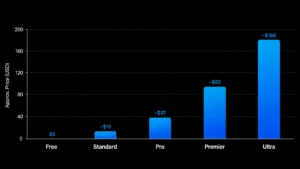
Kling’s pricing page makes the plans look simple — pay $10, $37, $92 or $180 a month and get a bucket of credits. What it doesn’t say upfront is that a credit isn’t worth a fixed amount of video. Resolution, audio, and — this is the part most guides get wrong — which model version you’re on all change how far your Kling AI credits actually go.
Visit Kling Ai Official Site
The short version on Kling AI credits:
Kling ai credits converts at $1 = 66 credits. Paid tiers run 660 (Standard), 3,000 (Pro), 8,000 (Premier), and 26,000 (Ultra) credits a month; the free plan gives 66 credits every day instead.
Here’s the catch: Kling 3.0 dropped the old “Standard Mode vs. Professional Mode” pricing that a lot of articles (including earlier drafts of this one) still describe. It now bills by the second, based on resolution and whether audio is on.
| Setting | Credits/sec |
|---|---|
| 720p, no audio | 6 |
| 1080p, no audio | 8 |
| 720p + audio | 9 |
| 1080p + audio | 12 |
| Native 4K | 30 |
These figures are Kling’s own reference values, not a guarantee that every 720p generation will consume the same number of credits. Kling specifically says users should account for model, feature, resolution and duration when planning their credit budget.
Do Kling AI image-to-video credits cost more than text-to-video?
No — Kling AI credits are charged by resolution, duration, and audio, not by whether the generation started from a text prompt or an uploaded image. An image-to-video clip at 1080p with audio costs the same 12 credits/sec as a text-to-video clip with identical settings. The confusion usually comes from older Kling 2.x pricing pages that quoted different rates for different generation modes — that distinction no longer applies under Kling 3.0’s per-second billing.
“Visit Kling Ai Official Site”
What Kling AI credits actually buy:
Credits aren’t cash — they’re an internal unit Kling ai credits deducts based on your settings when you hit generate. A silent 720p clip and a 4K clip with audio cost very different amounts, which is why “3,000 credits a month” doesn’t map to one fixed video count.
In dollars: 66 credits = $1, so 660 ≈ $10, 3,000 ≈ $45, 8,000 ≈ $121, 26,000 ≈ $394 at the standard rate. Subscriptions are usually cheaper per credit — just check the renewal price, not just the first-month discount.
How far Kling AI credits actually go:
Kling’s own 720p reference works out to ~20 credits/video. But most people want 1080p with audio, which costs roughly double that reference rate — the most common reason people run out of credits faster than expected.
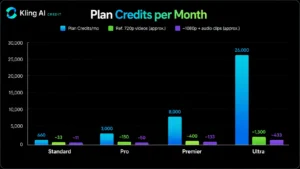
| Plan | Credits/mo | 720p videos | 1080p + audio clips |
|---|---|---|---|
| Standard | 660 | ~33 | ~11 |
| Pro | 3,000 | ~150 | ~50 |
| Premier | 8,000 | ~400 | ~133 |
| Ultra | 26,000 | ~1,300 | ~433 |
Kling AI credits disappear fastest at 4K – it costs 30 credits/sec — five times the silent-720p rate. On Pro’s 3,000 credits, that’s about 100 seconds of 4K total, before retries.
This reflects Kling’s official published pricing as of August 2026 — always confirm against Kling’s live pricing page before a large credit purchase, since rates and plan names can change.
″View Kling Ai Official Pricing″
Free Kling AI credits, expiry, and refunds:
The free plan resets 66 credits daily (not monthly) — enough for about two silent 720p clips, capped at 720p, watermarked, personal use only.
Expiry varies by credit type: monthly subscription credits last one month, 7-day credits last a week, purchased credits last two years.
Refunds: a technically failed generation gets its credits back automatically. A generation that completes but you just don’t like — no refund. Test cheap, then finalize.
Budgeting your Kling AI credits: a real example
Ten 5-second clips + five 10-second clips, all 1080p with audio, at 12 credits/sec:
- 10 × 5s = 600 credits
- 5 × 10s = 600 credits
- Total: 1,200 credits, before retries
That leaves a Pro plan (3,000 credits) room for roughly two more full passes — realistic, since AI video usually takes 2–3 attempts per usable clip.
Stretching your Kling AI credits:
- Test at 720p, no audio; finalize at full quality once the shot works.
- Match duration to the action — don’t generate 15 seconds for a 4-second beat.
- Skip audio if you’re adding it in post — it adds 30–50% to the cost.
- Sharper prompts = fewer retries, which saves more than any setting tweak.
- Check the live cost in the generation panel before a big batch — rates change.
Which Kling AI credits plan fits you:
- Free — testing only, not for anything you’ll publish.
- Standard (~$10) — light 720p/1080p use, a video or two a week.
- Pro (~$37) — the default for regular creators; enough room to iterate.
- Premier (~$92) — daily output or client work.
- Ultra (~$180) — agency-scale volume, especially with regular 4K use.
“Visit Kling Ai Official Site“
FAQ:
How many Kling AI credits do you actually get?
660/3,000/8,000/26,000 on paid tiers; 66 daily on the free plan.
How much is one credit worth?
About $0.015 at the standard $1 = 66 rate.
How many credits for a 5-second video?
~30 credits at 720p silent, ~60 at 1080p with audio (Kling 3.0 rates — older “10/35 credit” figures you’ll see elsewhere describe Kling 2.x).
Do credits expire?
Yes — monthly credits in 1 month, purchased credits in 2 years.
Does Kling refund failed generations?
Yes, automatically. Successful-but-unwanted results aren’t refunded.
How do I buy Kling AI credits?
Purchase credits directly from Kling’s official site through your account’s. Check Pricing




One Response